> ## Documentation Index
> Fetch the complete documentation index at: https://docs.lemrock.com/llms.txt
> Use this file to discover all available pages before exploring further.
# Send your product feed from Channable
> Create a Custom CSV feed for Lemrock in Channable and send us its URL.
If your catalog is in Channable, create a feed for Lemrock in your project. Channable gives you a feed URL: send it to your Lemrock contact. Your imports and other feeds aren't changed.
This guide covers the product feed. Send the [category file](/en/catalog/feeds#category-file) separately.
## 1. Create the feed
1. In your project, go to **Channels** and click **+ Create channel**.
2. Search for "Custom CSV" and choose **Custom (CSV)**.
3. Name the feed `Lemrock`, pick your catalog's country and keep the **comma** delimiter.
4. Click **Continue**.
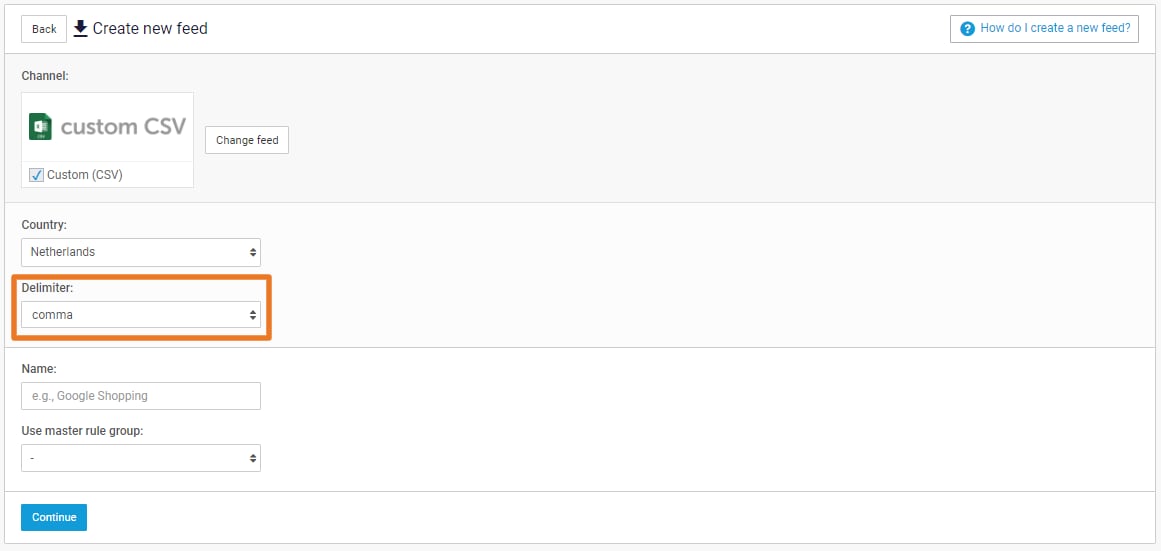 The country can't be changed later. If you sell in several countries, create one Lemrock feed per country.
**Categories**: skip this step. Lemrock uses your site's categories, in `product_type`.
## 2. Prepare your data with rules
In the **Rules** step, add the rules your data needs. They only apply to the Lemrock feed.
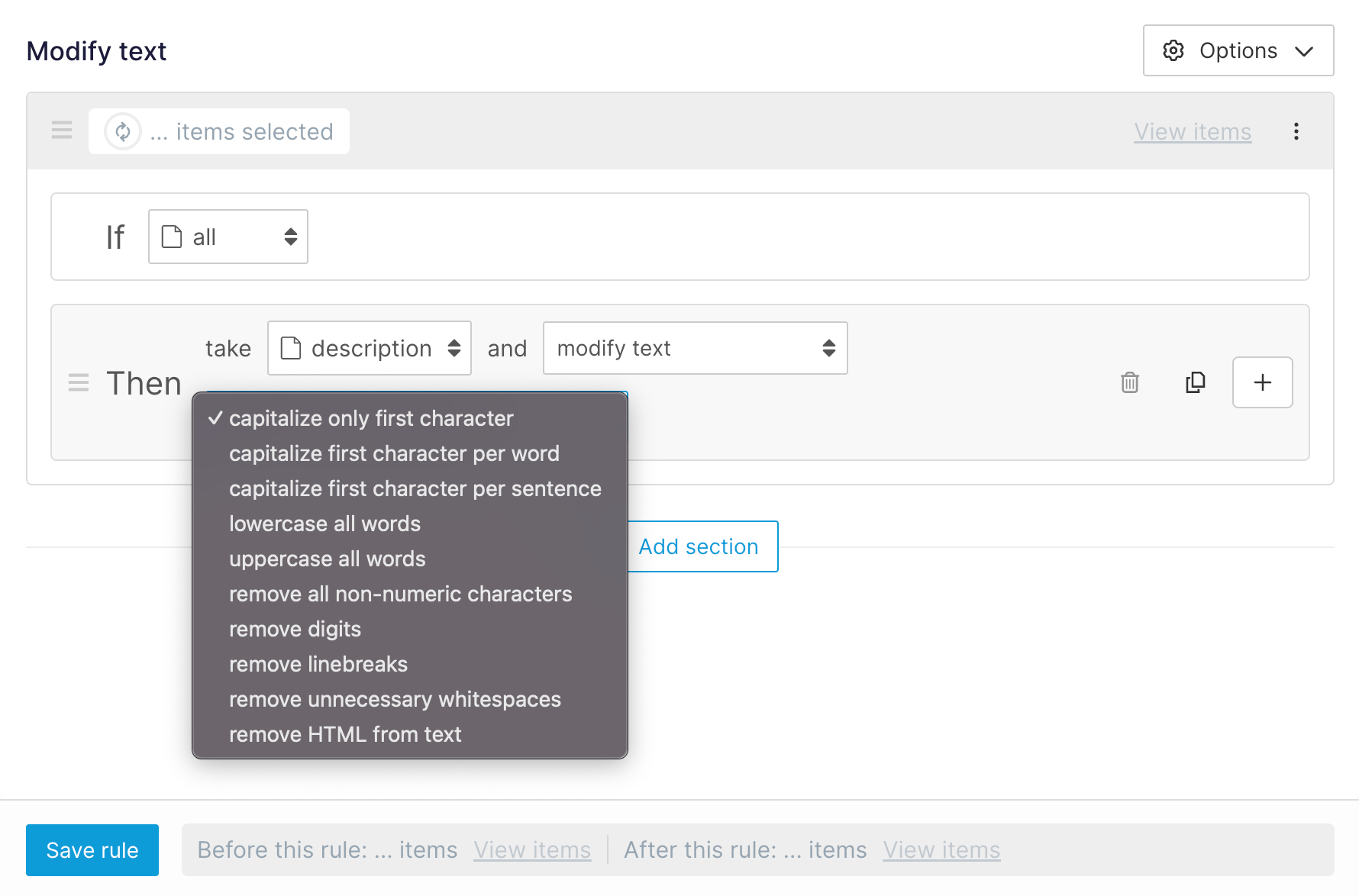
**Description**: if it contains HTML, create a rule **IF** `all` **THEN** `description` → **modify text** → **remove HTML from text**.
The country can't be changed later. If you sell in several countries, create one Lemrock feed per country.
**Categories**: skip this step. Lemrock uses your site's categories, in `product_type`.
## 2. Prepare your data with rules
In the **Rules** step, add the rules your data needs. They only apply to the Lemrock feed.
**Description**: if it contains HTML, create a rule **IF** `all` **THEN** `description` → **modify text** → **remove HTML from text**.
 **Title**: if it's over 150 characters, add a **maximum length** rule set to 150.
**Price**: Lemrock expects `799.00 EUR`. If your price field only holds the number:
1. Create a text field `lemrock_price` in **Setup > Project fields > + Add project field**.
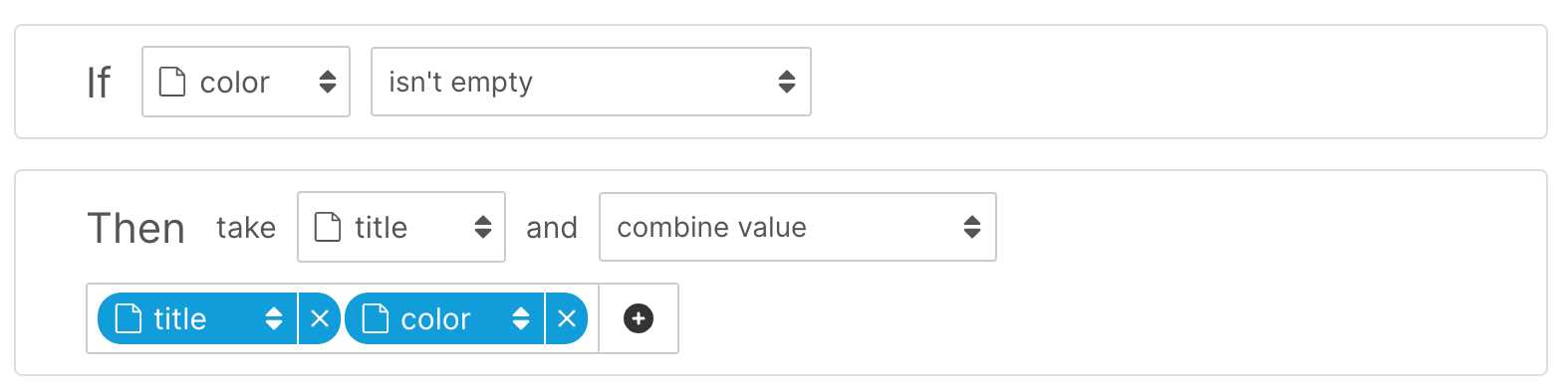
2. In the Lemrock feed, create a rule **IF** `all` **THEN** `lemrock_price` → **combine value**: your price field, then the text ` EUR`.
Do the same for `sale_price`. If your prices use a comma, add a **reformat number** rule first.
**Title**: if it's over 150 characters, add a **maximum length** rule set to 150.
**Price**: Lemrock expects `799.00 EUR`. If your price field only holds the number:
1. Create a text field `lemrock_price` in **Setup > Project fields > + Add project field**.
2. In the Lemrock feed, create a rule **IF** `all` **THEN** `lemrock_price` → **combine value**: your price field, then the text ` EUR`.
Do the same for `sale_price`. If your prices use a comma, add a **reformat number** rule first.
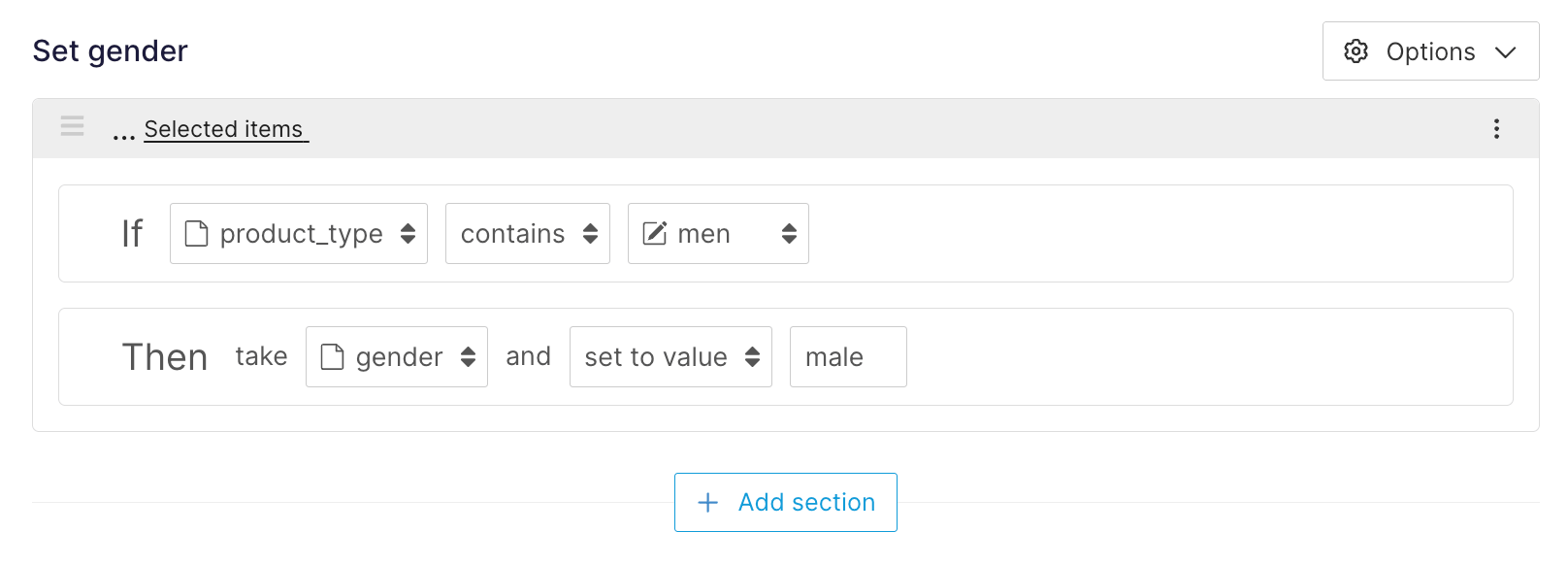
 **Availability**: Lemrock expects `in_stock`, `out_of_stock`, `preorder` or `backorder`. If your values differ, create a text field `lemrock_availability` and fill it with **set to value** rules. For example, with a stock quantity: **IF** `stock` is greater than 0 **THEN** `in_stock`, **ELSE** `out_of_stock`.
 **Additional images**: if they're in a list field, add a **join list to text** rule with a comma as separator.
**Variants**: don't use the **group items** rule. Lemrock expects one row per variant. If your catalog has parent rows that can't be bought, remove them with an **exclude** rule.
To send only part of your catalog, also use an **exclude** rule, for example on a brand or a category.
## 3. Map your fields
In the **Mapping** step, click **+ Add new field** for each Lemrock field. Pick your Channable field under **Internal field**, and type the Lemrock field name under **Channel field name**: it becomes the column name.
* **Required**: `id`, `title`, `description`, `link`, `image_link`, `price`, `availability`, `brand`.
* **Recommended**: `product_type`, `sale_price`, `gtin`, `mpn`, `item_group_id`, `additional_image_link`, `color`, `material`, `size`, `product_length`, `product_width`, `product_height`, `product_weight`.
Map `price` to `lemrock_price` and `availability` to `lemrock_availability` if you created them. For `id`, use the same ID as your [conversion tracking](/en/conversion-tracking/overview). What each field should contain is described in [Product feed](/en/catalog/feeds#fields).
Don't use **+ Auto-add all fields**: it would export all your fields.
## 4. Check and activate
In **Preview & export**, open the CSV preview and check a few products:
* one row per variant, with a unique `id`;
* the 8 required fields are filled;
* prices look like `799.00 EUR`;
* `availability` holds one of the four expected values;
* descriptions contain no HTML.
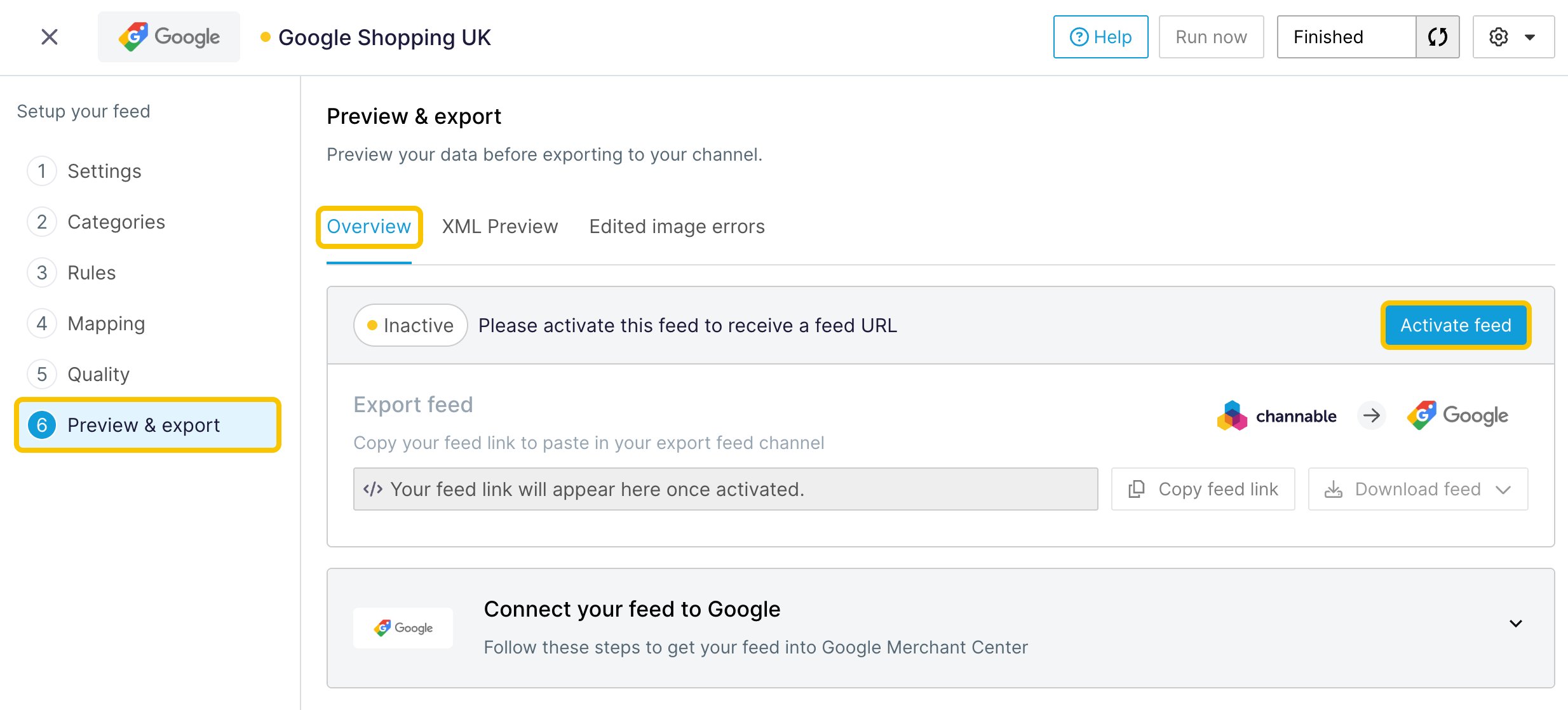
If your project isn't active yet, activate it in **Settings > Activate project**. Then, in the **Overview** tab, click **Activate feed**.
**Additional images**: if they're in a list field, add a **join list to text** rule with a comma as separator.
**Variants**: don't use the **group items** rule. Lemrock expects one row per variant. If your catalog has parent rows that can't be bought, remove them with an **exclude** rule.
To send only part of your catalog, also use an **exclude** rule, for example on a brand or a category.
## 3. Map your fields
In the **Mapping** step, click **+ Add new field** for each Lemrock field. Pick your Channable field under **Internal field**, and type the Lemrock field name under **Channel field name**: it becomes the column name.
* **Required**: `id`, `title`, `description`, `link`, `image_link`, `price`, `availability`, `brand`.
* **Recommended**: `product_type`, `sale_price`, `gtin`, `mpn`, `item_group_id`, `additional_image_link`, `color`, `material`, `size`, `product_length`, `product_width`, `product_height`, `product_weight`.
Map `price` to `lemrock_price` and `availability` to `lemrock_availability` if you created them. For `id`, use the same ID as your [conversion tracking](/en/conversion-tracking/overview). What each field should contain is described in [Product feed](/en/catalog/feeds#fields).
Don't use **+ Auto-add all fields**: it would export all your fields.
## 4. Check and activate
In **Preview & export**, open the CSV preview and check a few products:
* one row per variant, with a unique `id`;
* the 8 required fields are filled;
* prices look like `799.00 EUR`;
* `availability` holds one of the four expected values;
* descriptions contain no HTML.
If your project isn't active yet, activate it in **Settings > Activate project**. Then, in the **Overview** tab, click **Activate feed**.
 ## 5. Send the URL to Lemrock
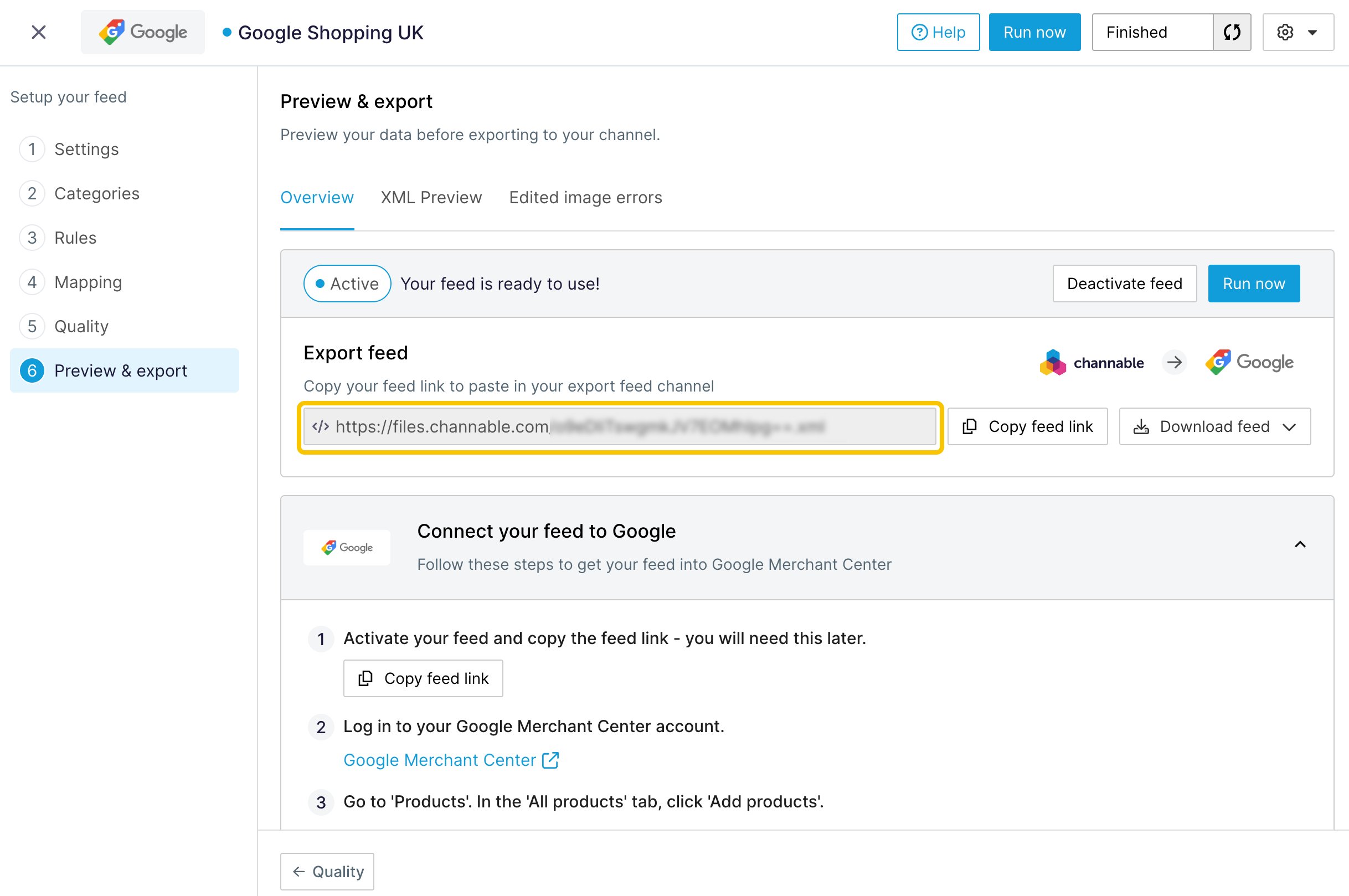
Once the feed is active, its URL shows in the **Overview** tab. Click **Copy feed link** and send it to your Lemrock contact.
## 5. Send the URL to Lemrock
Once the feed is active, its URL shows in the **Overview** tab. Click **Copy feed link** and send it to your Lemrock contact.
 Lemrock downloads the URL regularly: keep the project and the feed active. The feed updates at the times set in **Settings > Schedule settings**, once a day by default.
This documentation is built and hosted on [Mintlify](https://mintlify.com), a developer documentation platform.
Lemrock downloads the URL regularly: keep the project and the feed active. The feed updates at the times set in **Settings > Schedule settings**, once a day by default.
This documentation is built and hosted on [Mintlify](https://mintlify.com), a developer documentation platform.